
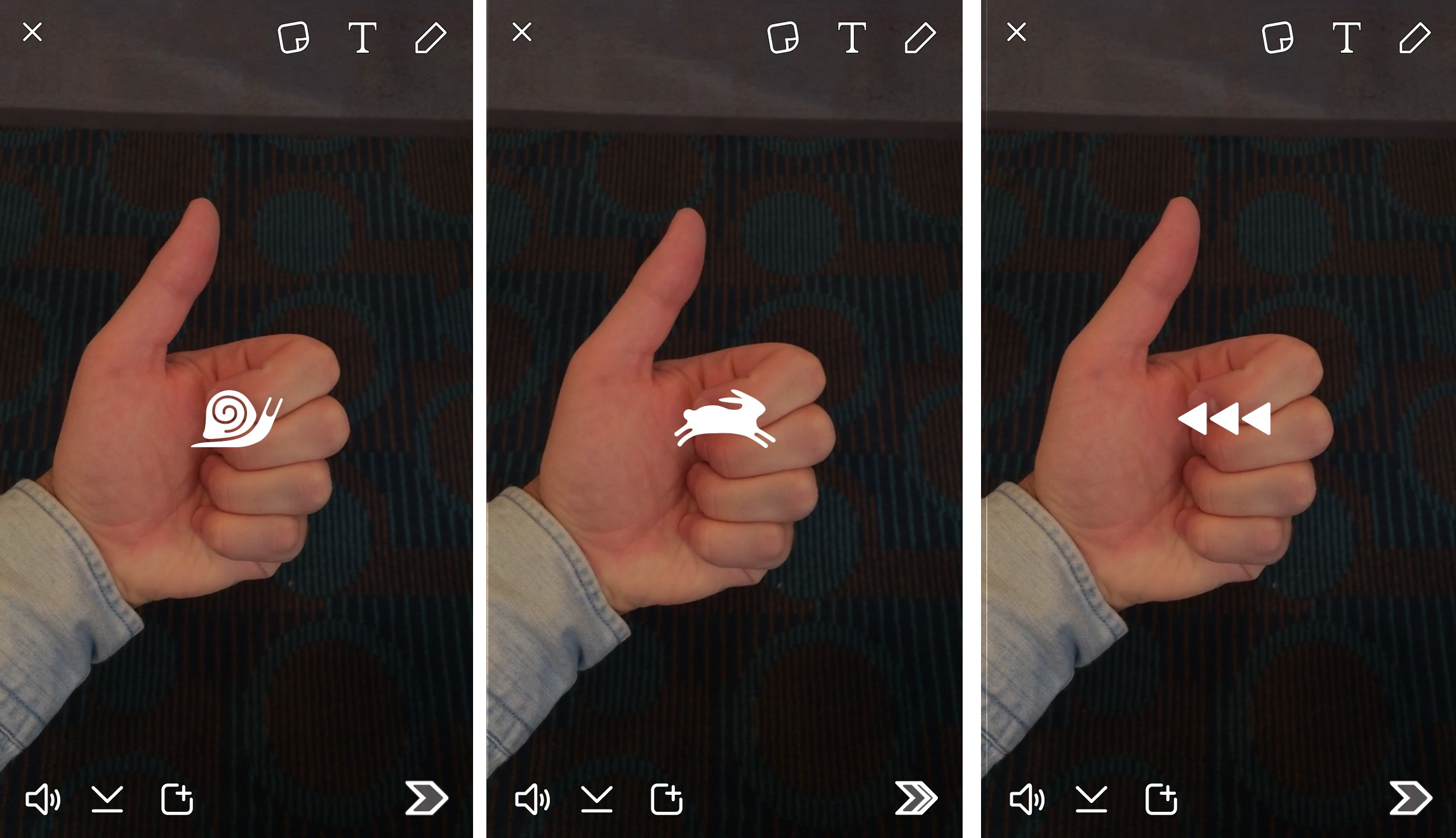
Barely a month after Snapchat introduced Lenses feature, the company added a new set of filters called “Speed Modifiers” for videos shoot on iOS or Android. This new feature allows Snapchatters to add slow-motion, rewind, and fast-forward filters to their videos. Rather than puke rainbows, users will also now be adding something closer to special effects to video Snaps. Just swipe sideways after shooting a video and you’ll eventually see them applied to your snap.
This feature opens up tons of creative opportunities. One can imagine people stringing together fast-forward, then rewind, then slow-mo clips to create a sort of highlight snap. The video filters will give normal people with just their phones the same special effect superpowers as a professional video editor. Snapchat is iterating on its platform fiercely, with new updates and functionality coming out as ways to attract new, paying users and advertisers. Earlier this month, the Financial Times reported that company was looking into Sponsored Lenses. With a business model focused around ads, Snapchat has to keep people coming back to watch as much content as possible. The better the content on Snapchat looks, the more they’ll come back to see the weird little moments from the lives of friends and celebrities.
How does the new Snapchat video filters work?
To use or enjoy the new video filters, you will first need to update the app which is available in the App Store and on Google Play or just tap the Snapchat app already installed for latest updates. Please note that updated app version is 9.18.0.0.
 |
| Pic Credit: techcrunch |
Slow-Motion: It reduces the speed of your video so that your friends can see everything in excruciatingly slow detail. After you shoot a video in the latest version of the app, simply swipe left or right until you see three arrows (rewind) or a snail symbol (slo-mo).
Fast-Forward: It makes your video play faster, which is great for sight gags of people falling, like in the example up top
Rewind: It plays your video back at the same speed but in reverse or it plays the video backwards.
 |
| Credit: techinsider |
The new update also includes 3D Touch features for users on iPhone 6S and 6S Pluses, allowing Snapchatters to quickly chat with contacts or add friends. You can strong tap on your Snapchat homescreen icon to quickly reach options for sending a snap or adding a new friend.
Also check Out:
Snapchat rewind filter on Android ~ Snapchat Updates Brings Rewind Filter to Android
Snapchat New Trophies - Snapchat Added Seven (7) New Trophies on December 22nd, 2015
Snapchat Chat Reply - How to Chat and Reply to Snaps or Stories on Snapchat
What does a Gold Star emoji mean on Snapchat? What Does a baby mean on Snapchat?
What are Snapchat Trophies? What do Snaptchat Trophies mean?
How to use Snapchat lenses?
Snapchat Add Nearby - Snapchat Update
How to use Snapchat? Setting up Snapchat Account
Download Snapchat for Android, iOS and Windows
How To Remove or Delete friends on Snapchat
How to Create and Send Snaps on Snapchat?
Snapchat Emoji meanings ~ Snapchat Updates
What Do Snapchat Emojis and Numbers Mean?
Snapchat Geofilters - Everthing you need to know
How to Search Snapchat Username, Lookup Snapchat Usernames
What Do Snapchat Emojis and Numbers Mean?
Snapchat Hack: How To Record Longer Videos On Snapchat or increase Snapchat Video length
